
Shopify store redesign: lessons from my Cleanflow work
My Cleanflow Shopify development work: eleven page redesigns, search and footer updates, and product UX. What to ask when hiring a Shopify developer.
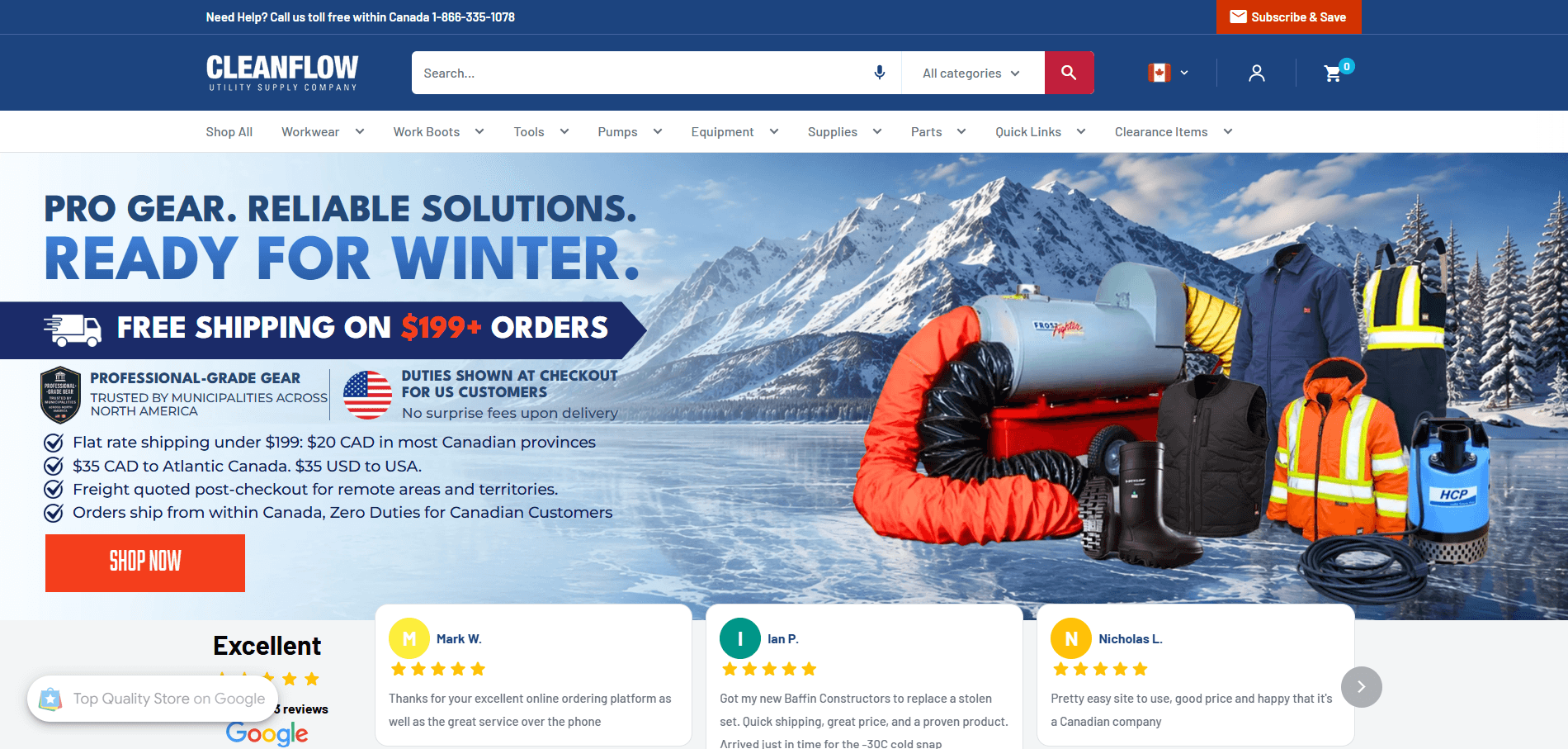
A Shopify store redesign can cover much more than the homepage. It can bring the search header, information pages, product details, footer and mobile experience into one consistent design while retaining the store's working forms and buying process.
My work for Cleanflow, a Canadian utility supply company serving Canadian and US customers, is an example. I redesigned the store's policy and supporting pages, built its market-aware FAQ, redesigned the footer and search header, and improved product-page behaviour. Shipping and returns were part of that work, but they were not the whole assignment.
If you are choosing a Shopify developer for an existing store, ask for evidence of how they handle shared templates, mobile layouts, market differences and releases. A polished homepage alone does not show how they will work through the rest of your storefront.
What did I redesign for Cleanflow?
The delivered work described here covers October 2026. It involved an existing Shopify store, with coordination around other contributors' work.
Eleven information pages and a searchable FAQ
I created a shared responsive design for eight policy pages: Shipping & Delivery, Returns & Warranty, Free Shipping Guidelines, Flat Rate Shipping, U.S. Shipping Regulations, Tax Exemption, Fair Pricing Guarantee and Shop With Confidence.
I then extended that design to Buy Canadian, Shipping FAQs and Contact. This made the information pages feel like one family through consistent typography, sections, spacing and navigation. Infographics on the policy pages could open at full size. Existing forms and relevant FAQ structured data were retained.
The Contact redesign kept the existing form while making phone and email links usable. A redesign should improve the presentation without losing the functions customers already depend on.
Alongside those eleven pages, I built a central FAQ with topic navigation, search and top questions. Canadian and US visitors see the answers relevant to their market. Returns and exchanges have distinct sections, with links from the store's Quick Links navigation.
A redesigned search header across the storefront
I made desktop search wider and gave mobile search its own full-width row. The redesign included a country flag selector, an account icon, a cleaner category dropdown and voice search where supported.
The scrolling header keeps search available while the announcement and navigation rows move out of the way. The work went through a preview before release, with checks on the homepage, product pages, collection pages and search results for both Canadian and US visitors.
This is a useful distinction when scoping a redesign: a shared header change affects many pages, even though it is implemented in one part of the theme.
A more readable footer
I redesigned the footer with darker text, clearer spacing and a dedicated Return & Exchange column. On phones, the content stacks into a readable single column. Existing links and wording were retained, with contact links made clickable.
The footer matters because it is often where shoppers look for help, contact information and policies. It needs the same attention as the pages above it.
Product-page and mobile improvements
The product work included accepted-payment icons, free-shipping messaging that accounts for freight exceptions, and trust links for returns, warranty information and the Fair Pricing Guarantee. Country-specific duties messaging was added, and final-sale products were excluded from the returns message.
On mobile, I stopped the automatic chat greeting from covering product information while keeping the chat launcher available. I also removed the meaningless "Default Title" selector from the sticky purchase bar without hiding useful single-option information, such as a size.
These changes required conditional behaviour as well as styling. A message that looks right on one product may be wrong on a freight item, a final-sale item or a product with a meaningful variant.
What should you include in a Shopify redesign brief?
Start with a page and template inventory. For each area, describe the current problem, the intended change and what must keep working.
- Shared elements: header, search, navigation, footer and mobile purchase controls.
- Information pages: FAQ, contact, shipping, returns and other policies.
- Product templates: variants, stock states, payment information, quotation paths and exceptions.
- Markets: country selection, relevant wording and links for each audience.
- Release checks: desktop and mobile previews, form behaviour and the pages affected by shared changes.
Use the same brief when comparing providers. Ask them to separate a visual redesign from new features, content changes and app integrations. This makes the proposed scope and estimate easier to compare.
Can a freelance Shopify developer handle this work?
Yes, a freelancer can handle a redesign of an existing Shopify store when the scope fits their skills and available capacity. My Cleanflow work demonstrates page design, theme development, market-aware behaviour and ongoing improvements within that kind of engagement.
An agency may be a better fit when you need several disciplines or parallel workstreams at once. Ask who will handle design, development, content, testing and support, whether you hire a freelancer or a team.
I work solo as Deeve Technologies, so clients work directly with the developer making the changes. For a comparison of delivery arrangements, read Shopify freelancer or agency: choosing for the work you need.
What evidence should you ask a Shopify developer to show?
Ask for the specific pages they redesigned, the behaviour they implemented and how the work was reviewed. Look beyond screenshots to the details that resemble your store: forms, shared navigation, country-specific content and product exceptions.
For Cleanflow, the process included design options, working previews, client review and checks after release. Shared theme areas were coordinated with another contributor so changes could be applied without overwriting their work.
Keep completed work separate from a roadmap. B2B account features, further quotation work and additional blog layouts were separate workstreams as of this October 2026 write-up; they are not presented here as completed redesign deliverables. Likewise, a delivery estimate developed for product pages was hidden after review, so it should not be described as a permanent live improvement.
How should you judge the result?
First check the delivered experience: consistent page layouts, usable search, readable mobile content, working forms and correct product messages. Then measure business outcomes separately using an agreed baseline and suitable analytics.
This article documents the redesign and development work. It does not claim a measured increase in conversion rate, revenue or search rankings.
If you need a developer to redesign an existing Shopify store, review my Cleanflow case study and Shopify development service. Bring your store URL and the pages or customer journeys you want to improve to a free project call, and we can define a first release.